
Showing posts with label new features. Show all posts

Wednesday, 30 June 2010

Weekly Garden Planner Email Improvements


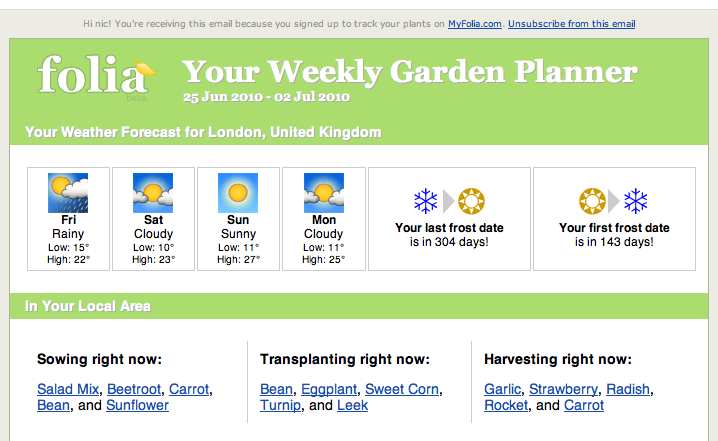
We’ve added a couple of new things to the newsletter – here’s a quick rundown of what to look out for when it hits your inbox today:

  • Local Gardening Group logic has been tweaked and we are showing more than your closest one. If you are in the UK or Aust. you’ll now also see your country group.
  • Discussions This Week now show only topics from the groups you are a member of – so if you want a bit more variety than the Chit Chat group, get out there and join some more groups !
  • Recommended gardeners to follow now filters out the people you are already following, so keep checking the list every month to find more interesting Folians near you.
  • Plant Match Maker – this is a brand new beta section that we are trialling, it will sort through your Wish List and find matching items that people have marked as available to swap, and will also try and find you some matches from our retailer plant catalogue lists (* sales made through the product catalogue links give Folia a small income, so definitely consider having a look at some of these if you can!)
  • The Planting Planner (Sow, Transplant, Harvest) now shows 10 suggestions instead of the entire list (for people with huge seed stash lists this section was huge!). Instead, we are linking to a new filter on your Seed Stash page that will show you everything in your seed stash for the event and month of your choosing. Confused? It’s probably easier to explain with an example: check out my List of Stash items available to Sow in June
  • Fixed a bug that was preventing some of you from receiving your weekly dose of Folia goodness. Hopefully everyone is getting their emails through now, but if you aren’t – firstly check your Junk / Spam folders. If it isn’t there, let us know and we’ll look into it for you.

Hope you like the improvements!

Sunday, 11 April 2010

New Seed Swapper Badges!

Some of you may of noticed a couple of new badges appearing on gardener profiles at the beginning of the week – this was the first little step in rolling out the first of our badges for seed swapping.

Basically, this means that if anyone completes a registered swap on Folia this will count towards the following badges:

All historical swaps before now have been calculated and badges awarded. From here, you’ll instantly be awarded the badge once you have reached the threshold and this achievement will be listed in your activity and your follower’s activity. You’ll also get a nice little email just in case you’ve missed all that other action ;)

Along with this, you’ll now notice that all of your existing badges on your dashboard and profile pages are now hooked up to badge pages explaining how they were earned, and who else has also achieved the same badge.

Furthermore, we now have a nice little leaderboard of seed swappers for 2010 and for all time to encourage a little bit of friendly competition :) I think we have ourselves a challenge: let’s get swapping!

Saturday, 24 January 2009

Tagging for your Gardens

A brand new feature from last week’s release is…tagging for your gardens! This means you can now categorise your gardens as much or as little as you like.

You’ll find a new field on your Add Garden and Edit Garden pages called “Categories” in which you can enter your category names (separate by spaces). Popular tags will now appear on the Garden Home Page so you’ll be able to find other gardeners that have categorised their gardens in the same way as you.

You’ll notice that for the meantime you’ll still have to classify by the existing garden types as well – we’ll be phasing this one out slowly and will eventually turn this into a primary category tag for your garden (you won’t have to change anything, it will all happen automatically).

Enjoy!

Saturday, 23 February 2008

Task / To-Do Lists Are Go!

After much work behind the scenes, last week we finally unleashed the first version of the gardening task / to-do lists – take a look under the Tasks tab on your homepage and you’ll find a link to start adding task reminders from there.

It’s pretty basic at the moment but we’ve already got a zillion ideas on how to make these lists really handy…we’d love to see what you guys think, so have a play around and go enter in some tasks!