Thursday, 19 August 2010

What are My Frost Dates? instant search (BETA)

New this week is another (beta) search page for finding your frost dates:

What Are My Frost Dates?

The idea is that this will be a standalone tool (exactly the same as the new What’s My Zone search page) – it should work worldwide as it is based on everyone’s Folian Frost Date observations. For the same reason, it can be a little less accurate as we are dealing with real data so we need your help to make it as good as it can be:

Check that you currently have the most accurate Frost Dates listed in your Gardener configuration settings

To make sure at the start that we are using the most accurate data available, instead of using the search to check your Frost Dates, try and validate your dates with an outside source if you can. Frost dates can be quite difficult to find, so it would be great if anyone finds some good sources that they could list them in this thread for others to use.

I’ll start with a few that I have found in my travels around the net:

http://www.victoryseeds.com/frost/ (US)

http://www.gardenaction.co.uk/main/weather.asp (US, UK and Australia)

Wednesday, 11 August 2010

"What's My USDA Zone?" Instant Search

Hi all – this week, we’ve also rolled out a new (beta) search page for finding your zone:

What’s My USDA Zone?

The idea is that this will be a standalone tool that anyone can use to check what zone they are in – it works worldwide as it is based on everyone’s Folian Zone observations. For the same reason, it can be a little less accurate as we are dealing with real data so we need your help to make it as good as it can be:

Check that you currently have the most accurate Zone listed in your Gardener profile, and each of your Gardens.

Make sure you are using the USDA Zone scale, not Sunset / Aussie etc. as different scales will effect the accuracy of the search.

To make the conversion easier, we have also developed a new Aussie to USDA Zone converter to easily check what your USDA zone is (if you don’t know your Aussie zone, check this site first).

Sunset to USDA is a bit trickier as Sunset is much more granular than USDA, so several Sunset Zones can be the same USDA Zone. We’re still working on a converter for this, but in the meantime you can find a basic converter here (if anyone can find any others, let us know!)

The wikipedia entry on Hardiness Zones is also a good reference point to use.

Why does Folia use the USDA Zone system?
We are using the USDA zone system as our standard reference point as it is the most widespread and recognizable climate zone system. We know it has a limited practical application in places where frost dates are rare or non existent, but the main benefit of the system is to group gardeners together that are in similar climatic conditions – so it’s a useful system for Folia to use (until a better system comes along!).

Anyway, let us know what you think about the new What’s my Zone? page !

New Garden Harvest Tally Reports

Quick note about a new feature for our lovely Supporters – from today, you’ll now see a “Harvest Tally” tab on your Garden profile pages.

This is a brand new page that summarises all of your harvest logs for every year of your garden. Instead of basing this on the traditional Jan – Dec calendar year, the year is based on whatever date you choose your gardening year to start at – you can configure this date over on your Account Configuration page.

The page is also nicely printable (only prints the tally, not the rest of the page), and also is exportable for import to your favourite spreadsheet program. You’ll find both of these options over on the right hand side of the page.

How far you can go back in your harvest history is also configurable – it’s based on your garden’s Established Year – to change, edit your garden and you’ll find a box to modify (under the Location details).

To see an example, check out my Rooftop Terrace Garden Harvest Tally from last year (I can already see that this year hasn’t been nearly as productive as last!), cristina’s Herb’s and vegetable garden or flowerweaver’s Vegetable garden (both have weights AND amounts recorded and are much more diligently entered than my own records!)

This feature is exclusively available to our Supporters. Supporters help us keep the site up-and-running and allow us to spend time working on funky new features like this one. Check out your Account Upgrade page for details on how you can become a Folia Supporter.

Let us know what you think! If you have any suggestions or issues with using this feature, please log it over in our new Support / Feedback area so we can track it through for you :)

Wednesday, 7 July 2010

New badges: Wiki Contributor / Editor / Curator

Just before our trip back to Australia, we released a couple of new badges to the site to reward Folians that contribute to our plant / variety wiki.

The new badges are:

Wiki Contributor – Awarded to Folians that have contributed at least once to the plant wiki.
Wiki Editor – Awarded to Folians that have made a significant contribution to the Plant Wiki.
Wiki Curator – Awarded to Folians that have made an extraordinary contribution to the Folia Plant Wiki.

These awards will be instantly awarded when you contribute to the wiki the required number of times (we’re not going to disclose the exact number of edits you need for the Editor and Curator badges – they are definitely achievable though)

This time, we haven’t back awarded these badges to Folians who have already earned these – instead they will be calculated and awarded next time you edit the wiki – so go add something to the wiki and see what happens!

Friday, 2 July 2010

The Folia Mobile App is an Apple Staff Pick today

We submitted the Folia Mobile Web app to the Apple directory early this week, and woke up this morning to find that they have featured us as a staff pick! Yay!

Here’s the link to the actual directory page if you want to take a look:
http://www.apple.com/webapps/utilities/foliagardentracker.html

Wednesday, 30 June 2010

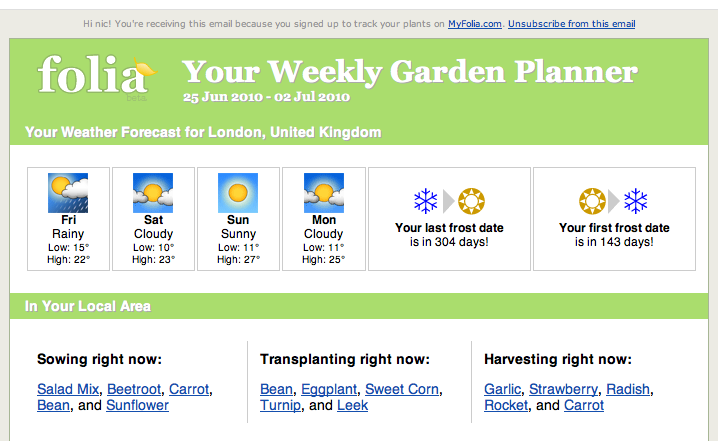
Weekly Garden Planner Email Improvements


We’ve added a couple of new things to the newsletter – here’s a quick rundown of what to look out for when it hits your inbox today:

  • Local Gardening Group logic has been tweaked and we are showing more than your closest one. If you are in the UK or Aust. you’ll now also see your country group.
  • Discussions This Week now show only topics from the groups you are a member of – so if you want a bit more variety than the Chit Chat group, get out there and join some more groups !
  • Recommended gardeners to follow now filters out the people you are already following, so keep checking the list every month to find more interesting Folians near you.
  • Plant Match Maker – this is a brand new beta section that we are trialling, it will sort through your Wish List and find matching items that people have marked as available to swap, and will also try and find you some matches from our retailer plant catalogue lists (* sales made through the product catalogue links give Folia a small income, so definitely consider having a look at some of these if you can!)
  • The Planting Planner (Sow, Transplant, Harvest) now shows 10 suggestions instead of the entire list (for people with huge seed stash lists this section was huge!). Instead, we are linking to a new filter on your Seed Stash page that will show you everything in your seed stash for the event and month of your choosing. Confused? It’s probably easier to explain with an example: check out my List of Stash items available to Sow in June
  • Fixed a bug that was preventing some of you from receiving your weekly dose of Folia goodness. Hopefully everyone is getting their emails through now, but if you aren’t – firstly check your Junk / Spam folders. If it isn’t there, let us know and we’ll look into it for you.

Hope you like the improvements!

Thursday, 24 June 2010

Connect your Facebook and Twitter accounts to Folia (and also earn a badge)!


Hi all – we’ve just rolled out a brand new release of goodies to the site today, the biggest change being Facebook and Twitter integration!

Via the new Account page in your profile , you can now connect your Facebook and Twitter accounts directly to Folia. Everytime you post a new planting, milestone or journal you can choose if you wish to also post a message to either account. You don’t have to post all the time – just unselect the checkbox for either or all and your post will not be sent to either party.

As a little bonus, if you connect your accounts you’ll also get some awesome little “Connected!” badges on your profile :)

How do I connect my Twitter account with Folia?

  1. Go to your new Account page in your profile
  2. Click the “Sign-in with Twitter” light blue button and a window on twitter should appear asking you to authorize us. Remember that we will never post to your stream unless you ask us to.
  3. Click the “Allow” option and you’ll be taken back to your account page – your twitter account details should now be displaying if everything went tickety-boo.

How do I connect my Facebook account with Folia?

  1. Go to your new Account page in your profile
  2. Click the “Sign-in with Facebook” dark blue button and a window on facebook should appear asking you to authorize us (if you aren’t signed in, it will display a sign-in box first). Facebook will request a couple of “advanced privileges” (as they call them) which basically authorizes Folia to post to your stream. Remember that we will never post to your stream unless you ask us to.
  3. Click the “Allow” option and you’ll be taken back to your account page – your facebook account details should now be displaying if everything went tickety-boo.

As this is a huuuge change, we need your help in testing this feature – so connect your accounts, get posting and let us know if there are any problems in the Bugs & Issues group . Thanks!

Update: Forgot to also add that you can also use your Facebook profile pic on Folia if you want as well – after you connect your Facebook account, go to your Photos page and you should see your profile pic appear in the list of suggestions.